Vilnius · Kaunas · Klaipėda · Šiauliai

Mercedes navigation map update

Mercedes navigation map update for COMAND, NTG and Audio 50 systems: detailed Lithuania, several dozen European countries and a 12-month warranty on the update.

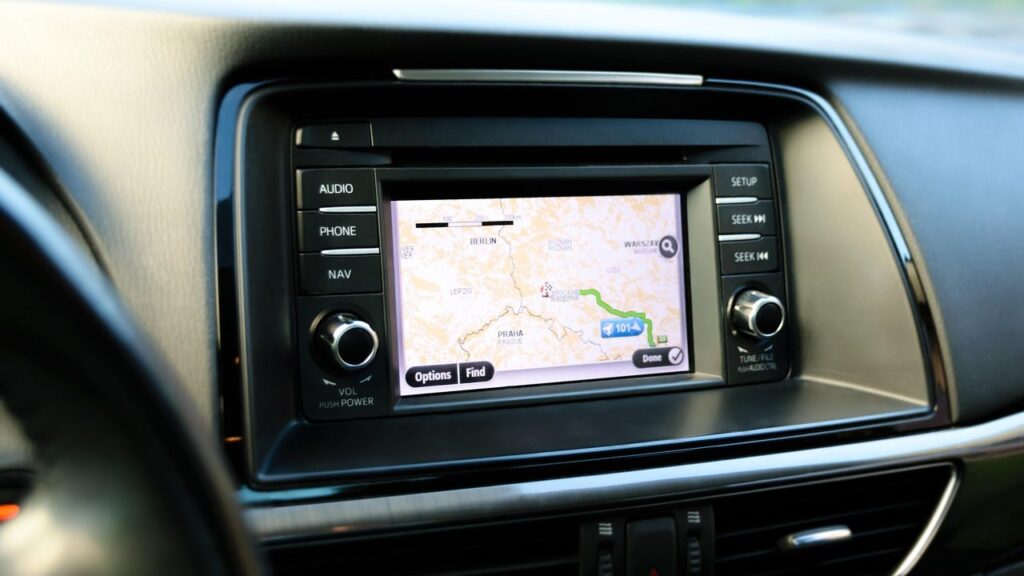
Alfa Romeo car navigation screen with a map

techremontas.lt Repair receipt

map update warranty
12 mo.
initial diagnostics
€10
fault identification
1–2 days
working hours Mon–Fri
9:00–18:00

Price agreed before repair · warranty on work

Which city is more convenient for you?

Vilnius

Kareivių g. 11A, Žirmūnai

„Rimi“ next to McDonald’s

Kaunas

Savanorių pr. 155, Žaliakalnis

Klaipėda

Sausio 15-osios g. 13

Next to „Avitela“

Šiauliai

Gegužių g. 30

PC „Arena“

  • Diagnostics within 1–2 days
  • Price agreed in advance
  • Mon–Fri 9–18
  • All contacts

A Mercedes navigation map update is the replacement of outdated maps in older COMAND, NTG and Audio 50 systems with newer ones, so that the car knows the new roads, roundabouts and speed limits again. On this page you will find which Mercedes systems we update, how to recognize an outdated map and what to bring to the service point.

You can find general information about navigation systems of all brands on the navigation map update page. Here, it is only about Mercedes.

  • How much does an update cost? We give the exact amount once we have looked at your system and model, and we agree on it before any work begins. The initial diagnostics cost 10 €.
  • What warranty do you provide? We provide a 12-month warranty on map updates. Repair work is also covered by a warranty.
  • Which systems are supported? NTG1, NTG2, NTG2.5, NTG3, COMAND NTG4, COMAND Online (NTG3.5/NTG4.5), Audio 50 APS, and the older COMAND 2.0/2.5 system.
  • Where do you do the update? Mercedes map updates are listed for Vilnius and Kaunas. The service points work Mon–Fri 9:00–18:00 and are closed on weekends.
When it is time to update or check your Mercedes navigation

Some signs indicate only an outdated map, while others point to a system fault. Below is how this most often looks.

01

The navigation does not know new roads and roundabouts

WhyThe map on the old disc or card was created several years ago, so new streets and intersections are simply not in it.

Check it yourselfCompare your street with a phone map and look at the map version in the system menu.

What we doWe install a new map version for your system (NTG, COMAND or Audio 50) and check that Lithuania is displayed in detail.

02

Why navigation is not working – it shows “no map”

WhyThe map data is corrupted, the disc or card is read with an error, or the system no longer detects the data carrier.

Check it yourselfSwitch the ignition off and on again, and check that the card or disc is fully inserted.

What we doWe diagnose whether the fault lies with the carrier, the software or the reading device, and propose a solution.

03

Audio 50 system no longer reads the navigation CD

WhyOften a worn or scratched disc, less commonly a faulty reading mechanism.

Check it yourselfWipe the disc with a soft cloth from the center to the edges.

What we doWe check the disc and the reader, and if necessary, reinstall the maps.

04

The car’s position on the map „jumps”

WhyA weak GPS signal, a damaged antenna or a software error. In older systems, an outdated positioning program may also be the cause.

Check it yourselfPark the car in an open area and wait a few minutes.

What we doWe check the GPS signal and the antenna, and fix the software error.

05

Navigation without internet shows only an old image

WhyOlder Mercedes systems store maps on a local storage medium and do not update them on their own, while the data for COMAND Online versions also has to be installed.

What we doWe install new maps so that navigation works without a connection. We write about the mobile option in the article about offline maps.

06

Navigation is not in Lithuanian or the screen does not respond

WhyThe system’s language settings may have been changed, and an unresponsive screen is a software error or a control unit problem.

Check it yourselfCheck the language setting in the menu and briefly switch off the ignition.

What we doWe review the software and, if necessary, the control unit or the screen.

How much does a Mercedes navigation map update cost

We quote the price of the map update once we have looked at your system, and the initial diagnostics cost 10 €.

Diagnostics

ServicePriceWarranty
Initial diagnostics10 €–

Map update

ServicePriceWarranty
Mercedes map update (NTG, COMAND, Audio 50) – price agreed according to the systemcompatible12 mo.
Map update (NTG1, NTG2, NTG2.5, NTG3, NTG4)from 60 €12 mo.
COMAND Online (NTG3.5/NTG4.5) updatefrom 90 €12 mo.

Faults and software

ServicePriceWarranty
Software error fixfrom 40 €–
GPS antenna check and replacementfrom 35 €–
Screen or control unit repairfrom 80 €–
We give the exact amount after diagnostics and agree on it before starting work; we repair only with your consent, and there are no hidden fees.

What people confuse about Mercedes navigation

  • Myth. Phone navigation replaces the car’s system. In reality. A phone is convenient, but the integrated system shows the route on the instrument cluster and does not depend on mobile coverage. You can find a comparison in the article about Waze and Google Maps.
  • Myth. It is impossible to update the map of an old system. In reality. Maps are available for most NTG, COMAND and Audio 50 systems; you just need to know the exact system type.
  • Myth. The update will erase my settings. In reality. Only the map data is changed. Still, it is worth writing down your usual list of places before the work.

Mercedes navigation map update: which systems we handle

Mercedes systems differ by year of manufacture, so first we need to know the name of your system. The maps cover European countries, with Lithuania in detail.

We update the following systems:

  • NTG1: CL C215, S W220, SL R230
  • NTG2 and NTG2.5: A, B, C (W203), CLK, G, GL, M, R, Vito, Viano, Sprinter
  • NTG3 and COMAND NTG4: S W221, CL W216, C W204, GLK, E W212
  • COMAND Online (NTG3.5/NTG4.5): for example, W176 A-Class, W246 B-Class, W166 ML
  • Audio 50 APS-1, APS-2, APS-2.5 and APS-4, as well as the older COMAND 2.0/2.5

If you do not know the system type, tell us the car’s make, model and year – we will help identify it.

A technician updates the car's navigation maps

Is it worth updating an old Mercedes navigation system

A new original map set or a system replacement usually costs considerably more than an update. If the screen and sound work, an update is most often the most sensible choice.

If the system is faulty, we first carry out a 10 € diagnostic. It becomes clear whether new maps are enough or whether the hardware needs repair.

The older the map, the more often new roundabouts and roads are missing, so it is worth updating at least a few years before a longer trip.

What to bring for a Mercedes navigation update

  • Your Mercedes model, body code and year (vehicle registration certificate)
  • Your current SD card, USB drive or navigation CD, if the system uses them
  • The PIN code or other system data, if it is required
  • A few saved favourite places or addresses
  • A short description of when and how the fault appeared

How a Mercedes navigation update works

  1. Call or bring it in. Visit your nearest service point, or call first to discuss your system.
  2. We identify the system. Based on the model and year, we determine the exact system type (NTG, COMAND or Audio 50).
  3. Diagnostics. If there is a fault, we identify it within 1–2 business days. Initial diagnostics cost 10 €.
  4. We agree on the price and timeframe. Work is carried out only with your consent, with no hidden fees.
  5. Collect it with a warranty. Map updates come with a 12-month warranty, and repair work is covered by a warranty as well.

A few more questions about Mercedes navigation

Does the navigation work without the internet?

Older Mercedes systems store their maps on a local medium, so they do not need the internet. The maps simply become outdated until you update them.

Will the updated map be in Lithuanian?

Lithuania is marked as detailed in the maps. The language of the system menu depends on your car’s settings and model.

Can I use Google Maps instead of the system?

Yes, as an additional tool. Learn more in our car navigation systems overview.

Will you update the NTG5 system?

NTG5 maps are not in our list, as maps for this system are listed as not yet released. We can check other models using your car’s details.

Other car brands

🚗 Professional navigation map updates – prices, process and service points

Broken device?

Give us a call – we will tell you what we can do and how long it will take.

Call Find a service point