Vilnius · Kaunas · Klaipėda · Šiauliai

Cartridge refilling: replacement with a new cartridge from 15 €

Cartridge refilling with us means replacing the laser cartridge with a new, factory-filled one – for the refill price, starting from 15 € incl. VAT. Tell us the model and we will tell you the exact price.

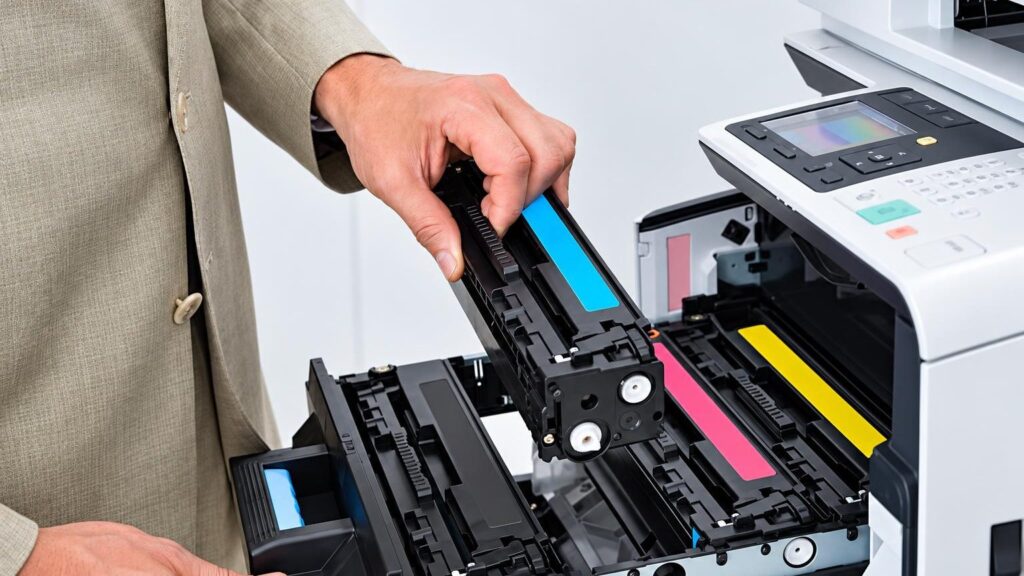
Laser printer toner cartridge, ready for replacement

techremontas.lt Repair receipt

cartridge replacement (incl. VAT)
from 15 €
initial diagnostics, all devices
10 €
fault identification
1–2 days
with service points: Vilnius, Kaunas, Klaipėda, Šiauliai
4 cities

Price agreed before repair · warranty on work

Which city is more convenient for you?

Vilnius

Kareivių g. 11A, Žirmūnai

„Rimi“ next to McDonald’s

Kaunas

Savanorių pr. 155, Žaliakalnis

Klaipėda

Sausio 15-osios g. 13

Next to „Avitela“

Šiauliai

Gegužių g. 30

PC „Arena“

  • Diagnostics within 1–2 days
  • Price agreed in advance
  • Mon–Fri 9–18
  • All contacts

Cartridge refilling at our service centre means replacing an empty laser cartridge with a new, already filled cartridge at the refill price. We offer compatible cartridges that work with popular HP, Canon, Epson and other laser printers. On this page you will find the price, a list of the most popular cartridges, a symptom guide (for when printouts are faint or streaky) and an explanation of why we no longer offer old-style refilling.

If your printer shows an empty cartridge and you are up against a deadline, first look up the cartridge or printer model label and contact your nearest service point. If the problem is not the cartridge but the machine itself, see the printer repair page.

  • How much does cartridge replacement (refilling) cost? From 15 € incl. VAT. We will tell you the exact price when you visit or by phone, based on the model. Initial diagnostics, when the printer itself needs to be checked, cost 10 €.
  • Do you refill cartridges the old way? No. We have discontinued old-style refilling – we replace the cartridge with a new filled one at the refill price.
  • Which cartridge models do you have? We try to keep the most popular HP, Samsung, Canon, Brother, Xerox, Epson, Minolta and Ricoh laser cartridges in stock. Please confirm the specific model by phone.
  • Do you provide a warranty? Yes, we provide a warranty on our work and products. We will explain the terms when you hand in the cartridge or printer.

The printer prints poorly: what it means and when the cartridge is really to blame

Before replacing the cartridge, it is worth working out whether the problem is really in it. Below are the most common symptoms we hear about at the counter and what the technician does about them. If the defect remains after the cartridge is replaced, the drum or the printer itself may be at fault.

01from 15 €

The printer shows an empty cartridge

WhyMost often the toner powder has really run out, or the cartridge chip has counted the set number of pages. Sometimes the message remains even when there is still powder left – the chip only „knows” the page count.

Check it yourselfDo not take the cartridge apart or shake it – fine powder can spill inside the printer. Write down the cartridge model label.

What we doWe check the model and replace the cartridge with a new filled one with a working chip.

02from 15 €

Faint printout, faded text

WhyThe toner powder is running low, the cartridge was refilled long ago, or the doctor blade is worn. Economy mode may also be turned on in the printer settings.

Check it yourselfCheck in the print settings whether toner-saving mode is turned on, and try a different type of paper.

What we doIf the settings are fine, we replace the cartridge. If the faintness persists even with a new one, we check the drum and the printer parts.

03

Streaks on the page, vertical lines

WhyThe most common cause is a damaged drum or worn blades. A cartridge that has been refilled many times ages together with these parts.

Check it yourselfDo not clean the inside of the printer yourself. Unplug the machine from the mains, without touching the fuser unit and high-voltage parts, and show the test page to the technician.

What we doWe determine whether the drum or the cartridge is at fault. If it is the drum, we replace it or the whole cartridge – whichever is more economical for your model. The price is given after diagnostics (10 €).

04

Toner spills, spots and dirty pages

WhyThis is a classic problem of a repeatedly refilled cartridge: the blades and seals are worn, and a damaged cartridge housing lets powder through. As a result, the printer itself also gets contaminated.

Check it yourselfDo not pick up spilled powder with a damp cloth or a vacuum cleaner – it is fine and gets into everything. Unplug the printer from the mains and contact the service centre.

What we doWe replace the cartridge with a new one and clean the inside of the printer. If powder has got into the mechanism, we check the fuser unit and rollers. The price is given after diagnostics (10 €).

05

The printer does not recognise the new cartridge

WhyThe chip may be incompatible, the cartridge may be inserted incorrectly, the protective film may not have been removed, or the printer firmware may not allow non-original cartridges.

Check it yourselfCheck that the protective strip has been removed and that the cartridge has clicked fully into place. Turn the printer off for a minute and turn it back on.

What we doWe check the compatibility of the cartridge and the printer and select the right cartridge version for the model.

06from 15 €

How to find out which cartridge fits my printer

WhyThe same printer may have several cartridge versions – standard and high-capacity. For example, HP model names contain the letter „A” and a number, while Brother uses the TN series.

Check it yourselfLook at the label on the old cartridge or at the printer model label on the casing and contact us – we will confirm the compatible cartridge.

What we doWe select the cartridge by model and tell you the price (from 15 € incl. VAT). If you need advice on choosing a printer, see the inkjet vs. laser comparison.

07

Printer jams or crumples paper

WhyThis is more often wear of the paper pickup rollers than a cartridge problem. Rollers that have been used for a long time become covered in dust and lose their grip.

Check for yourselfCheck that the paper is not damp or stuck together, and that no scraps have jammed in the tray. Do not reach inside the device.

What we doAfter diagnostics (10 €), we replace the rollers or clean the mechanism and check that the problem does not recur. The price is given before work begins.

How much does cartridge replacement (refilling) cost

The cost of cartridge replacement depends on the model, and the cost of printer repair depends on the fault.

Diagnostics

ServicePriceWarranty
Initial diagnostics10 €–

Cartridge replacement

ServicePriceWarranty
Replacing a laser cartridge with a new filled one (HP, Samsung, Canon, Brother, etc.)from 15 €–
Replacing a color laser cartridge (one color)from 35 €–

Printer parts

ServicePriceWarranty
Drum replacementfrom 25 €–
Paper pickup roller replacementfrom 30 €–
Fuser unit (fuser) replacementfrom 45 €–

Maintenance

ServicePriceWarranty
Cleaning the inside of the printer and preventive maintenancefrom 20 €–
Software and driver setupfrom 15 €–
Cartridge replacement costs from 15 € including VAT; we will give the exact price on arrival or by phone based on the model. The initial diagnostics for all devices costs 10 €, and we give the printer repair price after diagnostics and agree on it before starting work.

What people get wrong about cartridges

  • Myth. A refilled cartridge is always cheaper and just as good. In fact. Refilling leaves the same worn housing, blade and drum, so toner leaks more often and streaks appear. A new compatible cartridge sometimes costs even less than the old-style refill, and works more reliably.
  • Myth. A non-original cartridge damages the printer. In fact. A well-made compatible cartridge does not harm the printer. More dangerous are cartridges that have been refilled many times and spill powder.
  • Myth. If the printer shows “empty”, the toner has run out. In fact. The message is often caused by a chip that counts pages, and there may still be some powder left in the cartridge. However, you should not stretch it for long – print quality will drop anyway.
  • Myth. Print quality depends only on the cartridge. In fact. The drum, the fuser unit, the paper and the cleanliness inside the printer also matter a lot. That is why a poor print sometimes remains after the cartridge is replaced.

What cartridge refilling means today

In the past, refilling a cartridge meant emptying the remains from the same cartridge, pouring new powder into it through a drilled or melted hole, and sometimes replacing the drum or chip. The manufacturer usually intends only one cartridge cycle, so after several refills toner starts to spill and print quality deteriorates.

Now we can offer a new factory-filled cartridge for the price of a refill. That is why we no longer offer the old-style refilling, and instead replace an empty cartridge with a new one. This way you get all-new parts and fewer problems with the printer getting contaminated.

When a cartridge starts to fade, it is worth ordering a spare one in advance, based on the old model’s marking.

A technician replaces a cartridge in a laser printer

A new compatible or original filled cartridge

Many people think that an original refilled cartridge is better than a new compatible one. However, a cartridge consists of a housing, a drum, a magnetic roller, powder and a chip. After refilling an original, only the plastic housing with worn parts remains, which is also modified so that powder can be poured in.

Our comparison shows: complaints about new compatible cartridges were about 0.5%, while for refilled ones there were up to 20 times more. That is why we recommend new cartridges rather than ones refilled many times. If you print rarely, a cheap new cartridge is always more economical than repairing a contaminated printer.

If the printer is old and a cartridge for it already costs almost as much as a new laser printer would, it is better to calculate whether it is worth replacing the device itself – we will advise you by phone.

Which cartridge models we have in stock

We try to keep the most popular cartridges on hand so that you do not have to wait. Below are the most frequently requested laser printer models; if yours is not on the list, contact us and tell us your printer model.

We do not cover inkjet cartridges (for example, HP 305 or Canon PG-545XL) on this page and do not offer replacing them as a service.

  • HP: 285A, 435A, 436A, 278A, 283A, 505A, 280A, 279A
  • Samsung: D1042, D104, D101, D1052, D111, 1710, 1520, 4216, 4100, 4200, D1092, D117, 4655, D1082, 406
  • Canon: 725, 712, 713, 737, 103, 303, 703, FX9, FX10, 315, 519, 719, FX3, 731
  • Brother: TN2200, TN2210, TN2220, TN2225, TN2280, TN2010
  • Xerox: 3120, 3130, 3020; Minolta: 1480, 1490; Ricoh: AC104; Epson: 6200, 4518, 4519

Bring your old cartridge or photograph the label – we can identify the model from it in a few seconds.

How to extend the life of your cartridge and printer

Store the cartridge in a dry, cool place, upright, and take it out of its packaging only right before installation. Leave cleaning the inside of the printer to a service center – paper dust builds up around the rollers and the drum, and if you clean it yourself you may damage sensitive parts.

Use dry paper that is not stuck together. If pages come out stained or streaked after a cartridge replacement, do not wait for months – it is already a sign that other parts should be checked. You can find more about printer faults on the printer repair page.

What to bring to the service point

  • The old (empty) cartridge or a photo of its label showing the model designation
  • The printer model – written down or photographed from the casing
  • The power cable and USB cable, if you are bringing the printer itself
  • A few poorly printed pages as an example
  • A short note: when the problem appeared and how many times the cartridge has been refilled
  • Working hours – service centers are open Mon–Fri 9:00–18:00

How cartridge replacement and printer repair work with us

  1. Contact us or drop by. Bring the cartridge or printer to the nearest service center in Vilnius, Kaunas, Klaipėda or Šiauliai. You can also contact us beforehand and tell us the model.
  2. Cartridge price by model. The cartridge replacement price starts from 15 € incl. VAT; we will tell you the exact price when you arrive or by phone based on the model.
  3. Diagnostics, if the printer needs to be checked. Initial diagnostics for all devices costs 10 €, and the fault is identified within 1–2 business days. We will contact you and tell you what is broken.
  4. We agree on the price and timeframe. We tell you the repair price after diagnostics and agree on it in advance. We repair only with your consent, and there are no hidden fees.
  5. Repair or cartridge replacement. The technician replaces the cartridge or the faulty part and checks the print quality.
  6. You pick it up with a warranty. When you pick up the device, you receive a warranty for the work performed. We explain the warranty terms when handing it over.

Other frequently asked questions about cartridge refilling

Is cartridge refilling available in Panevėžys or Alytus?

We have service centers only in Vilnius, Kaunas, Klaipėda and Šiauliai. Residents of other cities can contact the nearest service center and consult about the model.

Do you replace inkjet cartridges, e.g. HP 305?

This page is for laser cartridges; we do not offer inkjet cartridge replacement here. If your inkjet printer is broken, see the printer repair page.

Do refilled cartridges harm the printer?

Repeatedly refilled cartridges may leak toner, contaminate the printer and thereby make repair necessary. That is why we offer new cartridges.

How does a compatible cartridge differ from an original one?

A compatible cartridge is not made by the printer manufacturer, but it is compatible with certain models. A quality cartridge made of new parts usually prints just as well and costs less.

Can I contact you before coming?

Yes, you can contact the service center in your city and tell them the printer or cartridge model. The service centers’ contact details are provided on this page.

Do you work on weekends?

No. All service centers are open Monday–Friday from 9:00 to 18:00 and are closed on weekends.

Broken device?

Give us a call – we will tell you what we can do and how long it will take.

Call Find a service point